Accessing Your IRS Account


The IRS, along with many other government agencies use ID.me for their secure digital identity verification service. ID.Me is used to confirm who you are online
-
- Who uses it: U.S. government agencies (like IRS, Social Security, VA), states (for unemployment benefits), and some private companies.
- How it works: You create an account and upload personal information (like a driver’s license or selfie). ID.me checks that info to confirm your identity.
- Why it’s used: Helps prevent fraud and identity theft when accessing benefits, tax services, or financial accounts.
What it does: Verifies your identity so you can ccess services safely.
Creating an ID.me account
Creating an ID.me account is a secure process that typically takes less than 10 minutes. You will need:
- a personal email address,
- a strong password,
- a government-issued photo ID (like a driver's license, state ID, or passport). **Other documents can include social security card, health insurance card,and W2
- a smart phone for receiving text authorization codes and taking pictures of identificaiton and a selfie to verify your identity-and that you are a live person
Verifying your identity with ID.me Self-Service
To verify with Self-Service, you’ll need:
- A smartphone with a camera
- Photo ID (U.S. driver's license or state ID, U.S. passport, or U.S. passport card)
- Social Security number
- Select your verification method (if available)
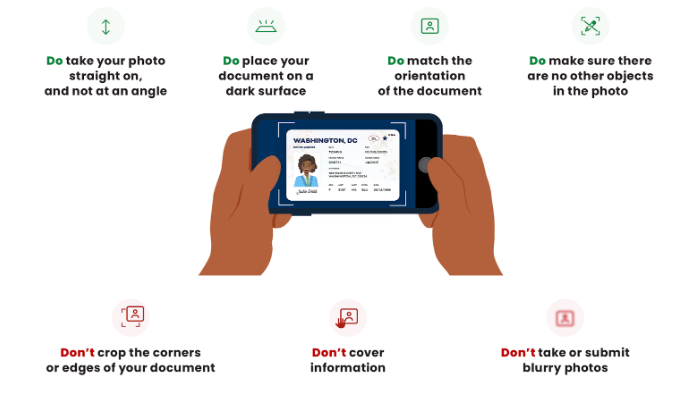
If given the option, select Self-Service. Some organizations allow you to choose between Self-Service or a short video call. - Upload your document
Upload your U.S. driver's license or state ID. To use a passport or passport card, select Change document. Learn how to upload your documents.
Take a video selfie
Take and submit a video selfie to verify that your face matches the photo on your ID. If your video selfie isn’t accepted, take another selfie using our video selfie best practices.
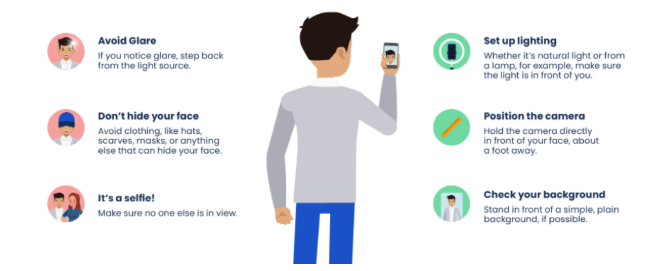
4. Enter your personal information- Enter your phone number and Social Security number when prompted. You may need to enter your U.S. address.
5. Review your information, then select Yes to confirm its accuracy.On the Authorize screen, review the information the organization will receive and select
6. Allow to consent to share the information.
Verification issues
- I couldn’t upload my document: Visit Document upload troubleshooting
- My document was rejected: Visit Rejected documents
- My selfie didn’t work: Visit Video selfie troubleshooting
If you're unable to verify using Self-Service, you may need to Verify with a short video call.
